
Browse Codex Pets
Discover custom pet packages for OpenAI Codex CLI and Claude Code. Copy install commands, browse community pets, and open source packages.

By lokyfile
A polished white desk buddy with a pink nose, smug stare, and judgmental little presence.


By jason
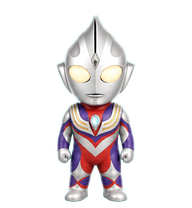
A chibi Ultraman Tiga desktop pet with silver helmet, glowing eyes, red-purple suit, gold chest armor, and cyan chest timer.

A playful white ghost mascot with soft plush-like 3D form, one open eye, one wink, a curved smile, and a tiny pink tongue.


By ldg
A black hand-drawn cat with a blue scarf, reproduced from the user's nine-state asset sheet as a Codex desktop pet.
By ldg
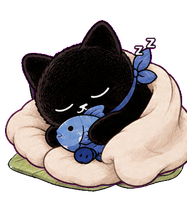
A happier hand-drawn black garden cat with round white eyes, a blue-gray neckerchief, and a cute cozy Zzz leaf-nap idle animation with innocent sleepy eyes.

By QuinnHaaa
A moss-haired swordsman who is absolutely sure the upside-down map is correct.

What Are Codex Pets?
Codex pets are virtual companions that live in your OpenAI Codex CLI terminal. Use /pet hatch to hatch a new pet, or install a custom pet package to personalize your coding companion. Custom Codex pets are defined by a pet.json file and a spritesheet.webp image — anyone can create and share one. Browse the gallery above to find community-made pets, copy the install command, and run it inside Codex to get your new companion.
Frequently Asked Questions
- How do I install a custom Codex pet?
- Copy the install command from any pet listing on this page, then run it inside your OpenAI Codex CLI session. The pet will replace your current companion.
- How do I hatch a Codex pet?
- Inside the Codex CLI, type /pet hatch to hatch a new pet from your available packages.
- How do I create a custom Codex pet?
- A Codex pet requires two files: pet.json (metadata and animation config) and spritesheet.webp (sprite frames). Host both in a public GitHub repo and submit it here for review.
- What do Codex pets do?
- Codex pets are animated companions visible in the Codex CLI sidebar. They grow, animate, and react as you code.