
Browse Codex Pets
Discover custom pet packages for OpenAI Codex CLI and Claude Code. Copy install commands, browse community pets, and open source packages.


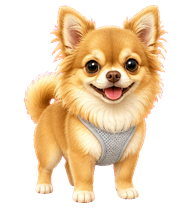
By Nging_ng
A tan-and-white long-haired Chihuahua with oversized glossy dark eyes, fluffy upright ears, a cream-white chest ruff, tiny white paws, a curled plume tail, and a light gray mesh harness.

By QuinnHaaa
A moss-haired swordsman who is absolutely sure the upside-down map is correct.

By side_inventory
Mitsuri-inspired love-breathing swordswoman pet with wide pink skill arcs and sparse heart-shaped accents while Codex runs.

By side_inventory
A tiny chibi Nezuko in her Swordsmith Village pink kimono, happily animated with her brother Tanjiro braiding her hair.

By iamohmcub
A tiny cute Codex pet inspired by the reference girl's soft brown hair, big brown eyes, rosy lips, and cream floral dress.





What Are Codex Pets?
Codex pets are virtual companions that live in your OpenAI Codex CLI terminal. Use /pet hatch to hatch a new pet, or install a custom pet package to personalize your coding companion. Custom Codex pets are defined by a pet.json file and a spritesheet.webp image — anyone can create and share one. Browse the gallery above to find community-made pets, copy the install command, and run it inside Codex to get your new companion.
Frequently Asked Questions
- How do I install a custom Codex pet?
- Copy the install command from any pet listing on this page, then run it inside your OpenAI Codex CLI session. The pet will replace your current companion.
- How do I hatch a Codex pet?
- Inside the Codex CLI, type /pet hatch to hatch a new pet from your available packages.
- How do I create a custom Codex pet?
- A Codex pet requires two files: pet.json (metadata and animation config) and spritesheet.webp (sprite frames). Host both in a public GitHub repo and submit it here for review.
- What do Codex pets do?
- Codex pets are animated companions visible in the Codex CLI sidebar. They grow, animate, and react as you code.