
Browse Codex Pets
Discover custom pet packages for OpenAI Codex CLI and Claude Code. Copy install commands, browse community pets, and open source packages.
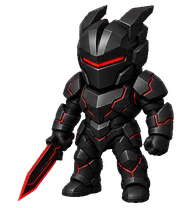
By itsmfknlucy
An original miniature obsidian systems warden with a red-black energy blade, built to command complexity with calm precision.

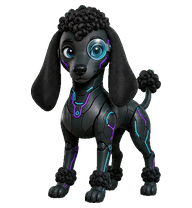
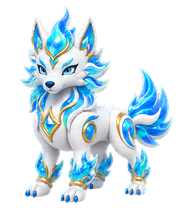
By TheB1ak3
A modern legendary bubble-wolf with living rainbow fire and precision-crafted serenity.
By rintintinjr
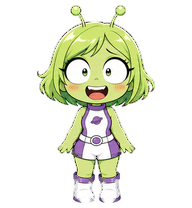
A comedic green alien girl mascot with huge startled eyes, lime-green bob hair, blushy cheeks, tiny antennae, and a playful sci-fi outfit; cute, expressive, pet-safe, and readable.

By anthony
A tiny Wudang Daoist sage Codex pet with a white beard, high hair bun, flowing teal-and-white robes, and calm tai chi energy.

By rintintinjr
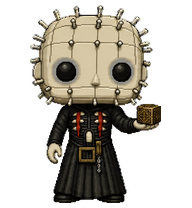
A compact stitched-doll horror pet with a knife and expressive pixel-art animations.

By 50BytesOfJohn
A cheerful golden pancake pet with a butter pat, rosy cheeks, and tiny syrupy energy.


What Are Codex Pets?
Codex pets are virtual companions that live in your OpenAI Codex CLI terminal. Use /pet hatch to hatch a new pet, or install a custom pet package to personalize your coding companion. Custom Codex pets are defined by a pet.json file and a spritesheet.webp image — anyone can create and share one. Browse the gallery above to find community-made pets, copy the install command, and run it inside Codex to get your new companion.
Frequently Asked Questions
- How do I install a custom Codex pet?
- Copy the install command from any pet listing on this page, then run it inside your OpenAI Codex CLI session. The pet will replace your current companion.
- How do I hatch a Codex pet?
- Inside the Codex CLI, type /pet hatch to hatch a new pet from your available packages.
- How do I create a custom Codex pet?
- A Codex pet requires two files: pet.json (metadata and animation config) and spritesheet.webp (sprite frames). Host both in a public GitHub repo and submit it here for review.
- What do Codex pets do?
- Codex pets are animated companions visible in the Codex CLI sidebar. They grow, animate, and react as you code.